Building a Microservices Architecture with PHP, Docker & Auth0
 · 7 min
Building a Microservices Architecture with PHP, Docker & Auth0
Introduction
Microservices architecture is an approach where an application is decomposed into small, independently deployable services, each responsible for a specific business domain. In this article, we walk through a concrete demo built in PHP that illustrates the core patterns: service isolation, inter-service HTTP communication, API aggregation, JWT-based security, and container orchestration with Docker and Traefik.
Architecture Overview
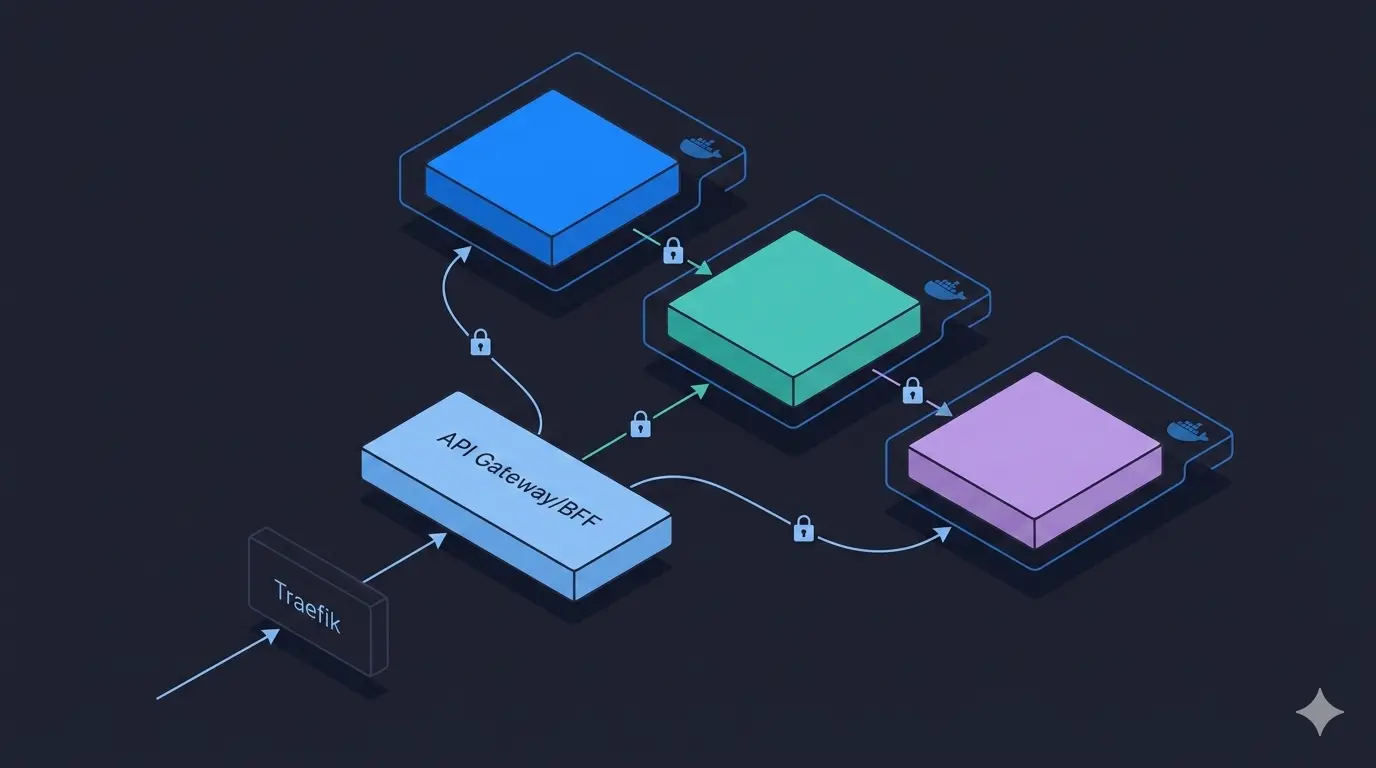
The demo consists of 3 microservices and a shared infrastructure layer:
                        ┌──────────────────────────┐
     Client ──────────> │   ms-back-for-front      │  (API Aggregation / BFF)
                        └────────┬────────┬────────┘
                                 │        │
                    ┌────────────┘        └─────────────┐
                    ▼                                   ▼
        ┌─────────────────────┐             ┌──────────────────────┐
        │   ms-learning-path  │ ──────────> │      ms-course       │
        │  (Learning Paths)   │  (HTTP)     │      (Courses)       │
        └─────────────────────┘             └──────────────────────┘
                SQLite                              PostgreSQL
All services are routed through Traefik, which acts as a reverse proxy and handles hostname-based routing (ms-course.lan, ms-learning-path.lan, ms-back-for-front.lan).
The Services
1. Course Service - ms-course
The simplest service. It manages Course entities (id, name) stored in PostgreSQL and exposes a basic REST API:
| Method | Endpoint | Description |
|---|---|---|
GET |
/courses/{id} |
Retrieve a course |
POST |
/courses |
Create a course |
DELETE |
/courses/{id} |
Delete a course |
Built with PHP 7.4, it uses Doctrine ORM to interact with the database and Symfony components for routing, DI, and configuration.
2. Learning Path Service - ms-learning-path
This service manages LearningPath entities (id, name, courses[]) stored in SQLite. A learning path is an ordered collection of course IDs.
What makes this service interesting is its dependency on ms-course: when creating a learning path, it validates that every referenced course actually exists by making an HTTP call:
// Service/CourseService.php
$endpoint = "http://ms_course/index.php/courses/{$id}";
$response = $this->httpClient->get($endpoint, [
    'headers' => ['Authorization' => "Bearer {$token}"]
]);
This illustrates a key microservices pattern: services own their data and communicate over HTTP, never via shared databases.
3. Backend For Frontend - ms-back-for-front (BFF)
The BFF pattern solves a common problem: clients need aggregated data, but services only expose granular resources. Rather than forcing the client to make multiple calls, the BFF does it server-side.
When a client calls GET /learning-paths/{id}:
- BFF calls
ms-learning-pathto get the learning path (with its list of course IDs) - For each course ID, BFF calls
ms-courseto fetch the full course object - It returns a single, enriched response combining both datasets
// Controller/GetLearningPathController.php
$learningPath = $this->learningPathService->get($id, $token);

$courses = [];
foreach ($learningPath['courses'] as $courseId) {
    $courses[] = $this->courseService->get($courseId, $token);
}
Security: JWT Authentication with Auth0
Each service uses Auth0 for authentication. Every incoming request must carry a valid JWT bearer token, verified by a JwtAuthorizer:
// Security/JwtAuthorizer.php
$token = $request->headers->get('Authorization');
$this->auth0->decode(str_replace('Bearer ', '', $token));
For service-to-service calls (M2M), the calling service uses the Client Credentials OAuth2 flow to obtain a token, which it then passes as a Bearer token in outgoing HTTP requests. Tokens are cached (filesystem) to avoid redundant Auth0 requests.
Cross-Cutting Concerns: Correlation IDs
All services propagate an x-correlation-id header across the request chain. If not provided by the client, one is generated as a UUID v4:
$correlationId = $request->headers->get('x-correlation-id') ?? Uuid::uuid4()->toString();
This enables distributed tracing — you can follow a single user request through all services in the logs.
Infrastructure: Docker & Traefik
Each service ships its own docker-compose.yml, and all join a shared external Docker network called toolkit_default.
The toolkit service starts Traefik v2, which auto-discovers services through Docker labels and routes traffic by hostname:
# toolkit/docker-compose.yml
services:
  traefik:
    image: traefik:v2.6
    ports:
      - "8000:80"   # HTTP traffic
      - "8080:8080" # Traefik dashboard
    volumes:
      - /var/run/docker.sock:/var/run/docker.sock
Services register themselves with Traefik via labels in their own docker-compose.yml:
labels:
  - "traefik.http.routers.ms-course.rule=Host(`ms-course.lan`)"
Application Internals: Symfony Components Without the Full Framework
Rather than using the full Symfony framework, each service uses only the components it needs:
symfony/routing— URL pattern matchingsymfony/http-foundation—Request/Responseabstractionssymfony/dependency-injection— Service container wired viaservices.ymlsymfony/config+symfony/yaml— YAML-based route and service configurationsymfony/cache— Filesystem adapter for token caching
This keeps each service lightweight and focused, with no framework overhead.
Key Patterns Illustrated
| Pattern | Where |
|---|---|
| Single Responsibility | Each service owns one domain (courses, learning paths) |
| Database per Service | PostgreSQL for courses, SQLite for learning paths |
| API Gateway / BFF | ms-back-for-front aggregates and shields the client |
| M2M Authentication | Client Credentials flow between services |
| Correlation ID propagation | Request tracing across service boundaries |
| Service Discovery | Traefik + Docker labels, no hardcoded routing config |
| Token Caching | Filesystem cache to reduce Auth0 round-trips |
Conclusion
This demo keeps the implementation intentionally minimal to let the architecture patterns shine. The key takeaways are:
- Microservices communicate over HTTP, never through shared state or databases
- Each service is independently deployable with its own container and dependencies
- Security must be enforced at every service boundary, not just the edge
- The BFF pattern is a practical solution to the aggregation problem without coupling clients to internal service granularity
- Lightweight framework usage (Symfony components à la carte) proves you don’t need a full framework to build structured, maintainable services